
Detecting and Neutralizing Stealthy WordPress Backdoor Campaigns
Recently, we encountered a sophisticated WordPress backdoor campaign targeting our infrastructure. This attack leverages “Must-Use” (MU) plugins to maintain persistence and evade standard security scans. Given the complexity of this threat, we wanted to share our insights to help other site owners better understand the risks and secure their WordPress installations.
How the Attack Operates
This sophisticated backdoor campaign operates under the radar by utilizing WordPress “Must-Use” (MU) plugins to maintain persistence. By deploying as an MU-plugin, the malware loads automatically with every WordPress request, bypassing the need for plugin activation. This makes it incredibly resilient against standard security tools and site updates.
Once active, the malware embeds itself deep within your installation:
- It hooks into the login process to harvest credentials.
- It establishes remote command channels for full server control.
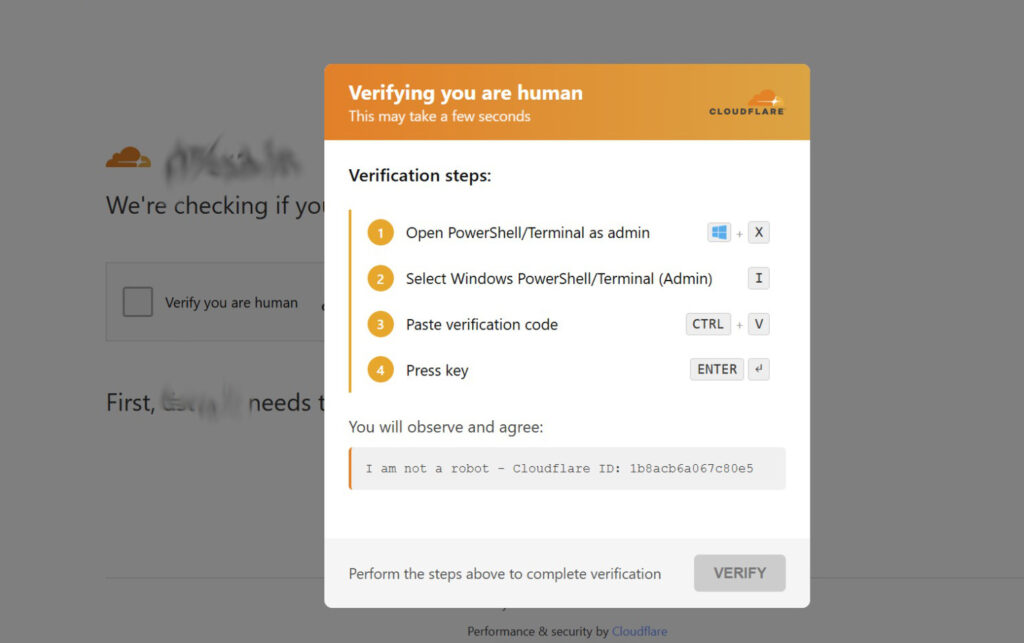
- It implements a Traffic Direction System (TDS) to quietly redirect your visitors to malicious websites while attempting to hide from admins and search engine bots. Site visitors could see a web page mimicking Cloudflare security check with a “Verify you are a human” checkbox in an attempt to create a backdoor to their computers.
Indicators of Compromise: Unusual File Storage
The malware mimics standard WordPress files to avoid discovery:
- Malicious MU-Plugins: These are critical to monitor as they are loaded automatically by WordPress without needing activation:
wp-content/mu-plugins/session-manager.phpwp-content/mu-plugins/wp-user-query-filter.phpwp-content/mu-plugins/health-check.php(often used as a decoy/stub)
- Credential Harvesting Files: Attackers store stolen data in files that look like images or CSS, such as:
wp-content/uploads/2024/06/Stained_Heart_Red-600x500.png(Note: These files often look like normal images, but they are frequently used as stubs containing obfuscated, XOR-encoded malicious code stored within the metadata or pixel data.)
If you open this file in plain text editor, this is what it shows:AhEMCBBcGgoARF5zUFhXW1kfUV9fCndLWgcHU5IiYV0=
login@example.com:P@$$W0rdwp-includes/css/wp-editor-font.csswp-content/upgrade/wp-db-backup.dat
- Backup Persistence Files: To ensure it stays active, the malware replicates itself in various directories. Look for these potentially malicious files:
wp-content/uploads/wp-cache-stats.phpwp-content/languages/wp-locale-handler.phpwp-content/upgrade/wp-update-verify.phpwp-includes/fonts/font-metrics.phpwp-content/uploads/woocommerce_uploads/wc-report-handler.php
Malicious Database Entries
The malware stores configuration and session data in your WordPress database to ensure persistence across reboots. Look for unexpected transients in your wp_options table:
_transient__wp_session_*_transient__tds_*_transient__tds_admin_ip_*_transient__wp_scatter_check_transient__analytics_cache_nuke_ok_transient__tds_cache_cleaned
How to Protect Your WordPress Site
The persistence mechanisms of this malware are multi-layered, making manual cleaning difficult. However, you can significantly reduce your risk by following best practices:
- Monitor Your
mu-pluginsDirectory: Regularly inspect thewp-content/mu-plugins/folder for any files you don’t recognize. - Limit File Editing: Disable the ability to edit themes and plugins directly from the WordPress dashboard by adding
define( 'DISALLOW_FILE_EDIT', true );to yourwp-config.phpfile. - Strict File Permissions: Ensure your web server has the correct, restricted permissions. The web server user should not have write access to critical core files or directories unless absolutely necessary.
- Use Security Plugins & WAF: A reputable Web Application Firewall (WAF) can block many common attack patterns before they hit your site.
- Keep Everything Updated: While some backdoors disable auto-updates, ensuring your core, plugins, and themes are kept current is your first line of defense.
- Regular Audits: Periodically audit your WordPress installation for unknown users, unusual cron tasks, and unexpected files in
wp-content.
Focus on Your Business, We’ll Secure Your Website
Don’t leave your site’s security to chance. At Dilli Labs, we provide comprehensive WordPress management services designed to keep your business running smoothly and securely. We take care of the technical heavy lifting so you can stay focused on growth:
- Proactive Security & Log Monitoring: We actively track server logs and monitor for suspicious activity, ensuring we catch potential threats before they escalate into full-blown attacks.
- Regular Maintenance: We handle all updates—core, plugins, and themes—to ensure your site remains patched against known vulnerabilities.
- Reliable Backups: We maintain frequent, secure backups so that, in the event of an issue, your data is safe and recovery is fast.
You have a business to grow; let us handle the technical burden. With Dilli Labs, you gain peace of mind knowing that your website is being monitored by professionals who ensure it remains functional, secure, and protected against even the most persistent attacks. We ensure your website will continue to function normally, you are covered against all attacks, and your data is always safe.
Ready to secure your site? Reach out to us today to learn more about our maintenance plans and how we can help you stay protected.